10 Top Widgets for your Mac
A list of useful widgets for your Mac, originally posted in 2009 so no longer useful for modern osX
There’s literally thousands of widgets available for your Mac, but before you know it you’ll have cluttered up yet another part of your Mac with things you don’t really need and very rarely use. So which ones are actually useful and worth the download? Here’s 10, in no particular order, that I use.
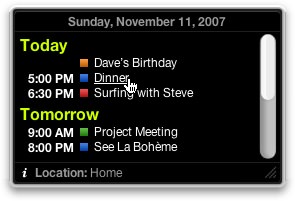
iCal Events: Keep track of your upcoming events at-a-glance. You can also specify which calendars to include.
Currency Converter: Add as many currencies as you like – type in the amount you’d like to convert and see the exchange rate in all of your chosen currencies.

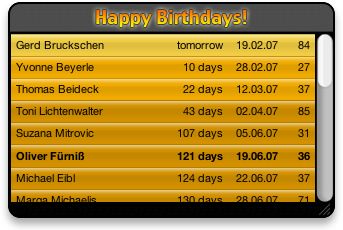
Happy Birthdays: Takes data from iCal and displays days remaining, date of birth and age at next birthday. No more excuses for those forgotten birthdays now!
iStat Nano: A system monitor that tracks all kinds of useful information such as processes, battery, machine temperature, fans. Very useful for all those techy details you need to know at-a-glance.

Montastic: Keeps track of your websites to make sure they’re all live with no downtime.

Word Counter: Not only counts the amount of words but also characters and instances of text. You can copy-paste into the text field or type away.

Designers Toolbox: Some useful conversion tools including paper sizes, HTML unicode characters, website font sizes, upload/download time for specific file sizes and connection speeds.

Countdown: Specify a future time and date and this widget will countdown the days, hours, minutes and seconds until that event. Useful for things like holidays or meetings

Corporate Ipsum: When you’re at the design stage of your project it’s unlikely the client will have the correct, if any, copy for their site. Use this Lorem Ipsum creator to generate some random text.

CharacterPal: If you regularly use special characters i.e. those ones that aren’t shown on your keyboard then this is an absolute must. Hover over a character to see what key combination you have to type.

3 replies on “10 Top Widgets for your Mac”
Leave a Reply
-
HTML email signature in Apple Mail
Step by step guide on how to add an HTML signature to Apple Mail.
-
FREE EU Cookie Law Script
If you haven’t already implemented the changes then we’ve put together a little bit of code to help you.
-
Secure your WordPress Blog
A guide to securing your WordPress website.
-
Remove the shadow from Mac Screen Grabs
How to remove the shadow from Apple Screengrabs.
-
10 Useful Sites for Web Developers
Some useful websites for web developers.
-
3 FREE Apps to protect your PC
A few free apps to help you protect your PC.
-
Web Browsing Tips #1: Find in Page
Find copy in page in a web page.
-
Web Browsing Tips #2: Tabbed Windows
Using tabbed windows in your web browser.
-
Web Browsing Tips #3: Keyboard Shortcuts
Some web browsing keyboard shortcuts.
-
Redirect your site the Search Engine Friendly way
Using a 301 redirect is important when you change your website URL or web page URL.
-
Remove the WordPress Meta Tag from your Blog
Remove the WordPress meta tag from your WordPress site with this small function.
-
Stay secure, use more than one password
We need passwords for everything, but how can we stay secure and have multiple passwords without having to remember them all.
Great collection, I also find Screenshot Plus and Dash Notes pretty invaluable
Thanks mate! Nice list! I would like to mention organized, witch has wordclocks, notes, events and a calendar, soo nice 🙂
Thanks Max – that certainly is another great widget that incorporates a number of the Apple widgets into a nice compact format. The link is http://www.apple.com/downloads/dashboard/business/organized.html